 Bee203
Features
Customer follow-up reminders that stop lost jobs
Stop losing jobs to forgotten call-backs
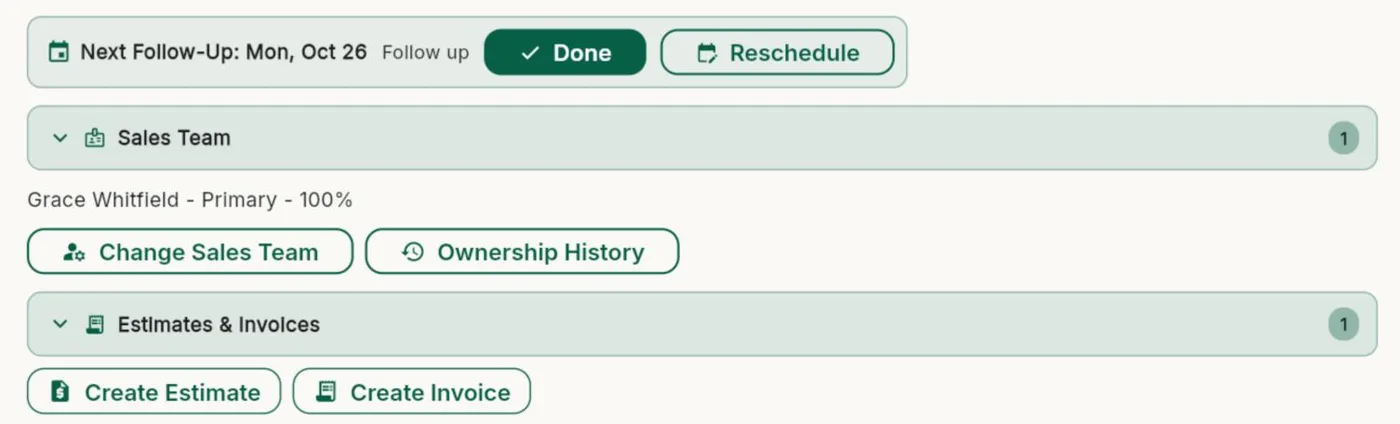
Set the next step and its date on any client. Bee203 reminds you, shows it where you work, and lets you mark it Done or Reschedule it in one tap.
What it does for you
Who to call nextA next follow-up on every active client, with a clear note of what to do.
Done or Reschedule in one tapClose it out or move it without opening anything else.
A list of everything pendingPending Work shows every open follow-up, with an overdue filter.
On your calendarFollow-ups sync to Google Calendar next to the rest of your day.
Included in
Tap a plan to see what it includes:
| Free | Starter | Books | Pro | Business | |
|---|---|---|---|---|---|
| Clients, contacts and follow-up reminders | 25 clients | ✓ | ✓ | ✓ | ✓ |
| Google Calendar sync | ✓ | ✓ | ✓ | ✓ | ✓ |
See every plan side by side on the Features page.
Watch this part
Follow-ups that don't slip · Watch this video on its own page →
Questions
Do follow-ups work on my phone?
Yes. Bee203 runs in the browser on any phone, tablet or computer.
Related features
Client management software: every client, one tap awayStop digging through texts, notes and memory.See how it works →
A voice CRM: just say it, Bee203 types itOn the job site or in the car, tap the help button, then the microphone, and tell Bee203 what you need.See how it works →
Route planner and client map for daily visitsSee every client on a map, build the day's route in order, check in at each stop, and find new businesses nearby.See how it works →
Try it with your own clients
Start free. No card needed.