 Bee203
Features
Sales commission tracking, without a spreadsheet
Pay your salespeople right, without a spreadsheet
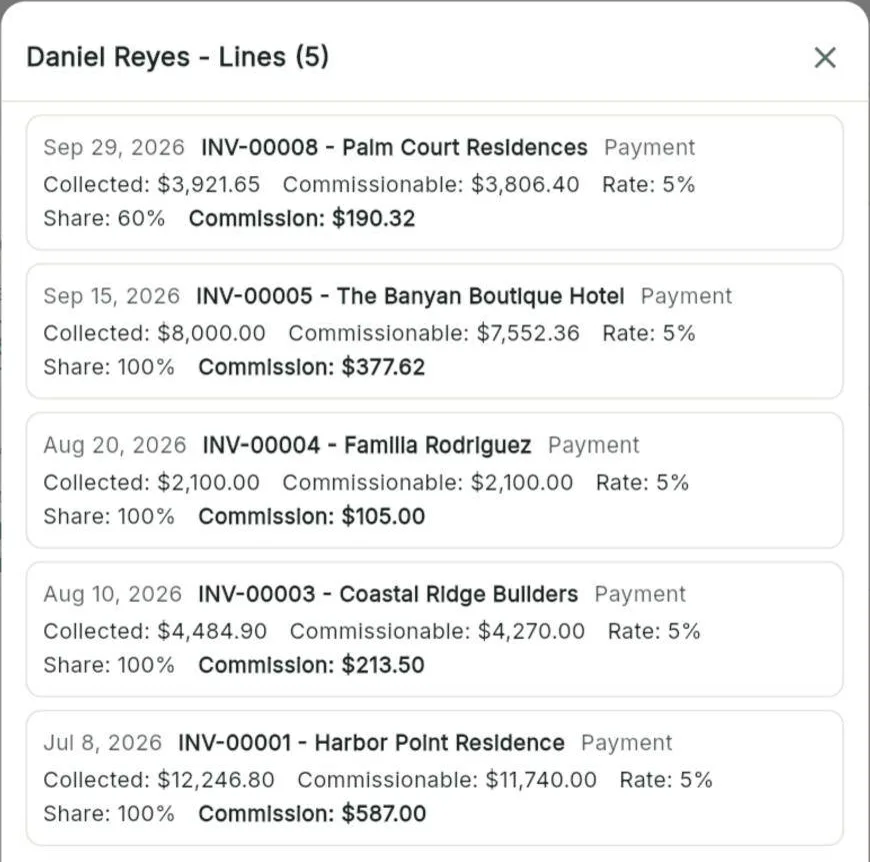
Reps earn when the client pays, not before. Bee203 works out the commission on every invoice you collect, without tax or shipping, splits shared deals, and has each month's statement ready.
What it does for you
Plans that fit how you payA base rate, plus different rates by product category if you want them.
Shared deals, clear numbersTwo reps on one client each earn their share: 60/40, 50/50, whatever you agree.
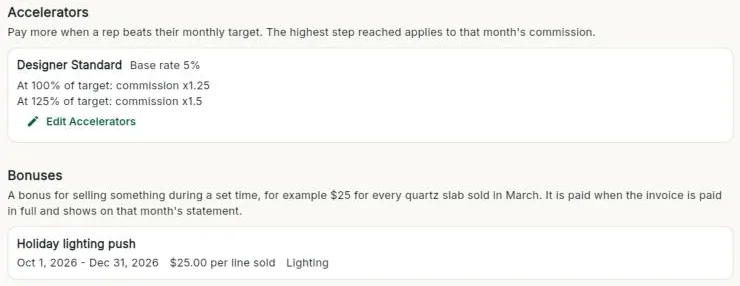
Reward great monthsAccelerators multiply the month's commission when a rep beats target; time-limited bonuses push a product line.
Payday in minutesMonthly statements per rep, a PDF statement, Record Payment, and export to CSV or Excel for payroll.
No argumentsEvery change of rep on an account is logged with the date and the reason.
Included in
Tap a plan to see what it includes:
| Free | Starter | Books | Pro | Business | |
|---|---|---|---|---|---|
| Sales commissions | – | – | ✓ | ✓ | ✓ |
| Commission accelerators and bonuses | – | – | ✓ | ✓ | ✓ |
See every plan side by side on the Features page.
Watch this part
Sales commissions and bonuses · Watch this video on its own page →
Questions
When does a rep earn commission?
When the client pays. Commission is counted on the amount collected, without tax or shipping.
Can two reps share a sale?
Yes. Each client can have a sales team with a share for each person.
Related features
A sales team CRM that sends every lead to the right repBee203 decides who gets each new client, reminds reps who to call, and shows you how the team is doing, so no lead goes cold and your best accounts are never forgotten.See how it works →
Route planner and client map for daily visitsSee every client on a map, build the day's route in order, check in at each stop, and find new businesses nearby.See how it works →
Job costing for small businessesSee what you invoiced, what labor and receipts cost, and the margin on every job, so you price the next one right.See how it works →
Try it with your own clients
Start free. No card needed.